Buying one gift for two people to share, like a set of walkie-talkies for the kids? Add it once, copy it to everyone sharing it, then split the price between the copies. Each person's budget then counts only their share.
Steps
- Add the gift for one of them as usual, at its full price.
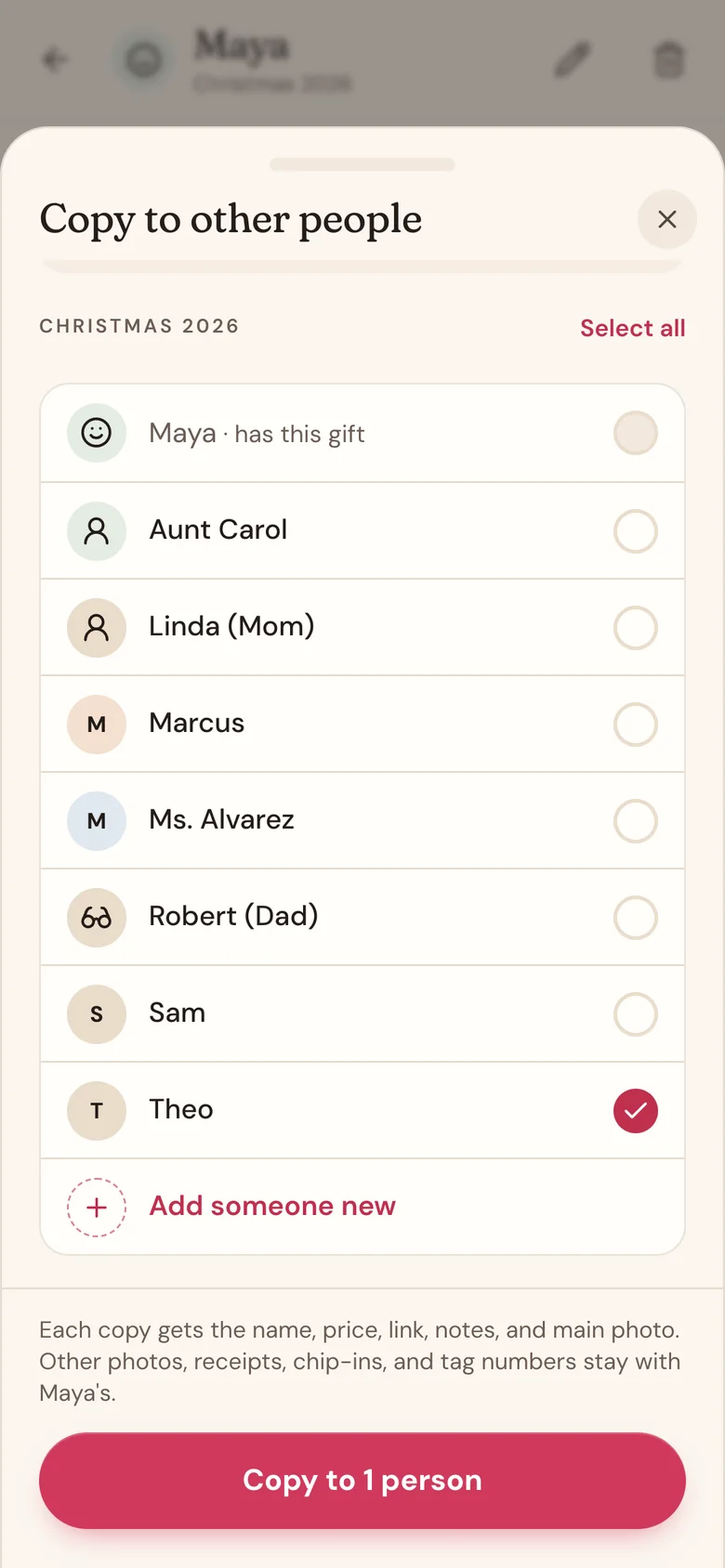
- Tap the gift to open it, then tap Copy to other people.
- Tick everyone else who's sharing it, then tap Copy to 1 person (or however many).
- Open the original gift, tap Edit gift, change Price to that person's share, and tap Save changes. For $30 walkie-talkies shared by two kids, that's $15.
- Do the same on each copy, so every price adds up to what you paid.
Good to know
- Splitting three ways or more? Divide the price by the number of people. If it doesn't come out even, put the extra cent on one of them: $25 for three is $8.33, $8.33 and $8.34.
- The shares don't have to be equal. If one child is getting more use out of it, give them the bigger share.
- After copying, each copy is its own gift. Mark each one Bought (and Wrapped or Done) as you go, since changing one doesn't change the others. A gift counts toward what you've spent once it's Bought or further along.
- A note helps you remember it's one gift: open a copy, tap Edit gift, and add something like "Shared with Theo" under Notes (optional).
- Wrapping it once? Set the copies to Wrapped too, so they don't show up as still to wrap.
- Copies go to people in the same gift plan. Not there yet? Tap Add someone new while copying.
Related
Still stuck?
Ask Wishpile and get an answer in seconds, or email support@wishpile.com and a real person will get back to you. Quick answers live in the FAQ.