Free · No email needed for kids

Your kids' wishlists, without the doubling up.

Keep one wishlist for each child, with no email or account for them. Paste in links to the things they already want, share it with Mom's side and Dad's side, and let the grandparents quietly claim gifts. You see who is getting what. Your child never does.

Free.No email for kidsClaims hidden from your childNo app to install

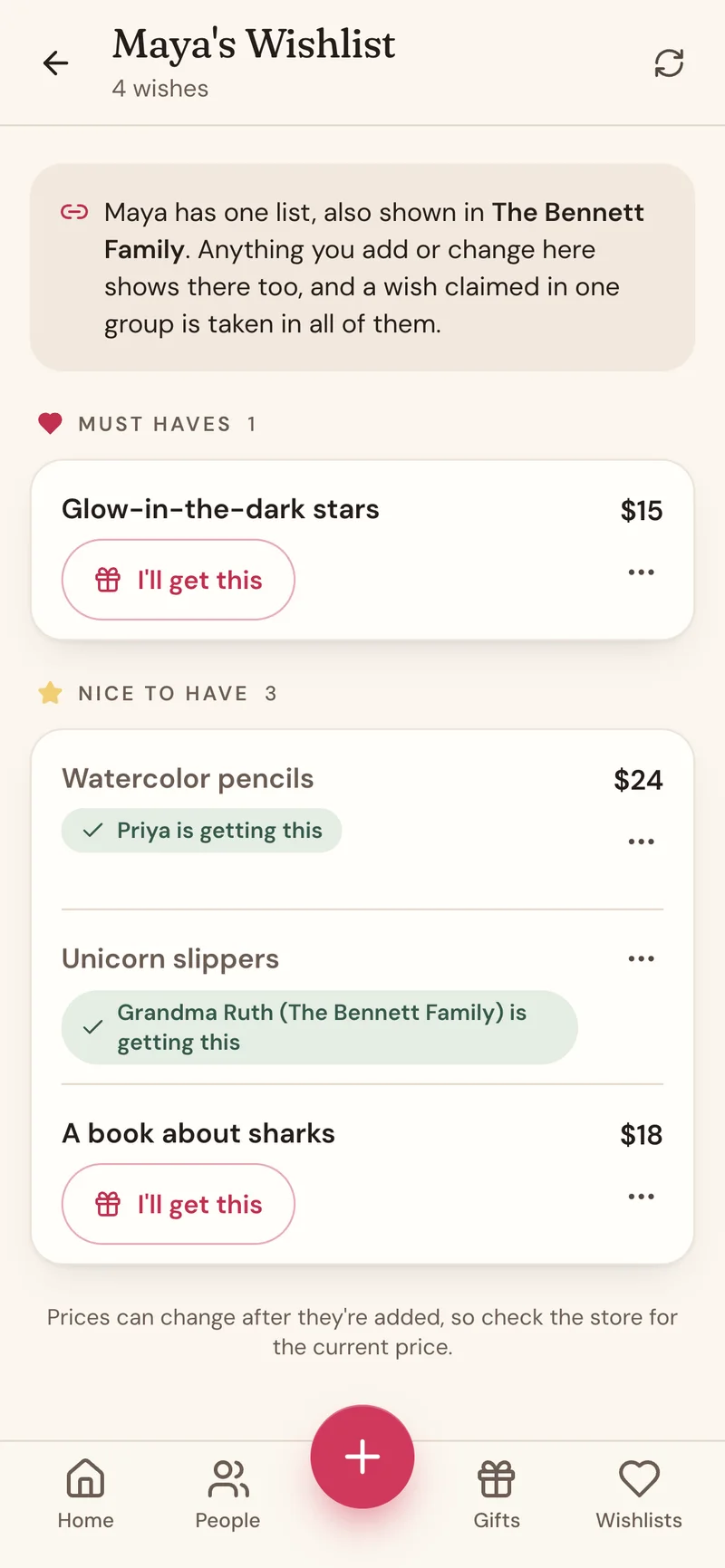
Maya's wishlist as her parent sees it: one list shown in two family groups, with Priya and Grandma Ruth each getting a gift and two wishes still open

One list, shown in every family group

  • Grandma and Grandpa
  • Aunts and uncles
  • Godparents
  • Dad's side
  • Mom's side
  • Step-family
  • Family friends
  • The teacher

01The other half

Why not just keep a list in the notes app or on Amazon?

A list in your notes app has to be texted around and goes out of date the moment someone buys something. An Amazon list only holds Amazon things. A kids' wishlist in Wishpile is one list from any shop, shown to every side of the family at once, where each claim is visible to the buyers and to you, and never to your child.

A list in a notes app or a text

  • Re-sent every time it changes
  • One store, or no links at all
  • Nobody knows what is already bought
All of that, plus

Your child's Wishpile list

  • One list that every family group sees, always up to date
  • Paste a link from any shop: name, price and photo filled in
  • Claims shared across groups, so both sides never double up
  • You see who is getting what; your child never does
  • Grandparents claim from a link, no account needed
  • Claimed gifts land in your own gift plan, with budgets and stages

02How it works

How do you make a wishlist for your child?

Step 1: Add your child to your family group

Open your family group and tap Add my child. Type their name and their list is ready. No email, no account, no app for them.

Step 2: Paste in what they want

Copy a product link from Amazon, Target, LEGO or any shop and paste it in. Wishpile fills in the name, price and photo for you.

Step 3: Family claims gifts quietly

Grandparents tap I'll get this from their invite link, no account needed. The gift shows as taken to everyone else in the family.

Step 4: You see it all, they see none of it

You and your partner see who is getting what, so you don't buy the same thing. Your child's view never shows a claim.

Start your kids' lists - free

Free. Nothing to install.

03What it does

What does a kids' wishlist in Wishpile do?

One list in every family group

Your child keeps a single wishlist that shows in every group they're in, Mom's side and Dad's side, say. Add or change a wish once and every group sees it, and a gift claimed in one group shows as taken in the others.
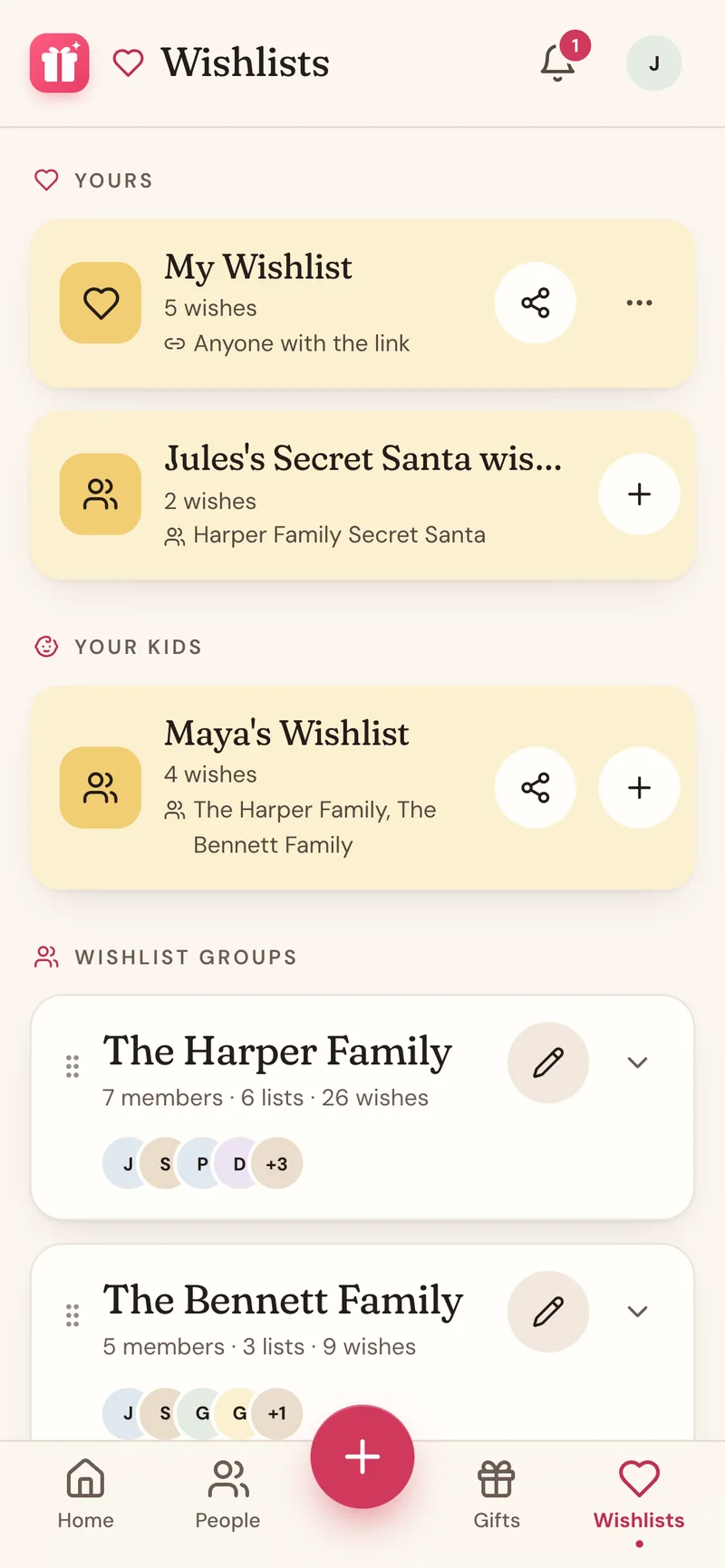
The Wishlists tab with Maya's wishlist under Your kids: one list her parent keeps, shown in both The Harper Family and The Bennett Family, with a share button

You see the claims. Your child never does.

Because you keep the list, you see which wishes are claimed and by whom, so you don't double up with the grandparents. Your child's own link never shows a claim on their list.
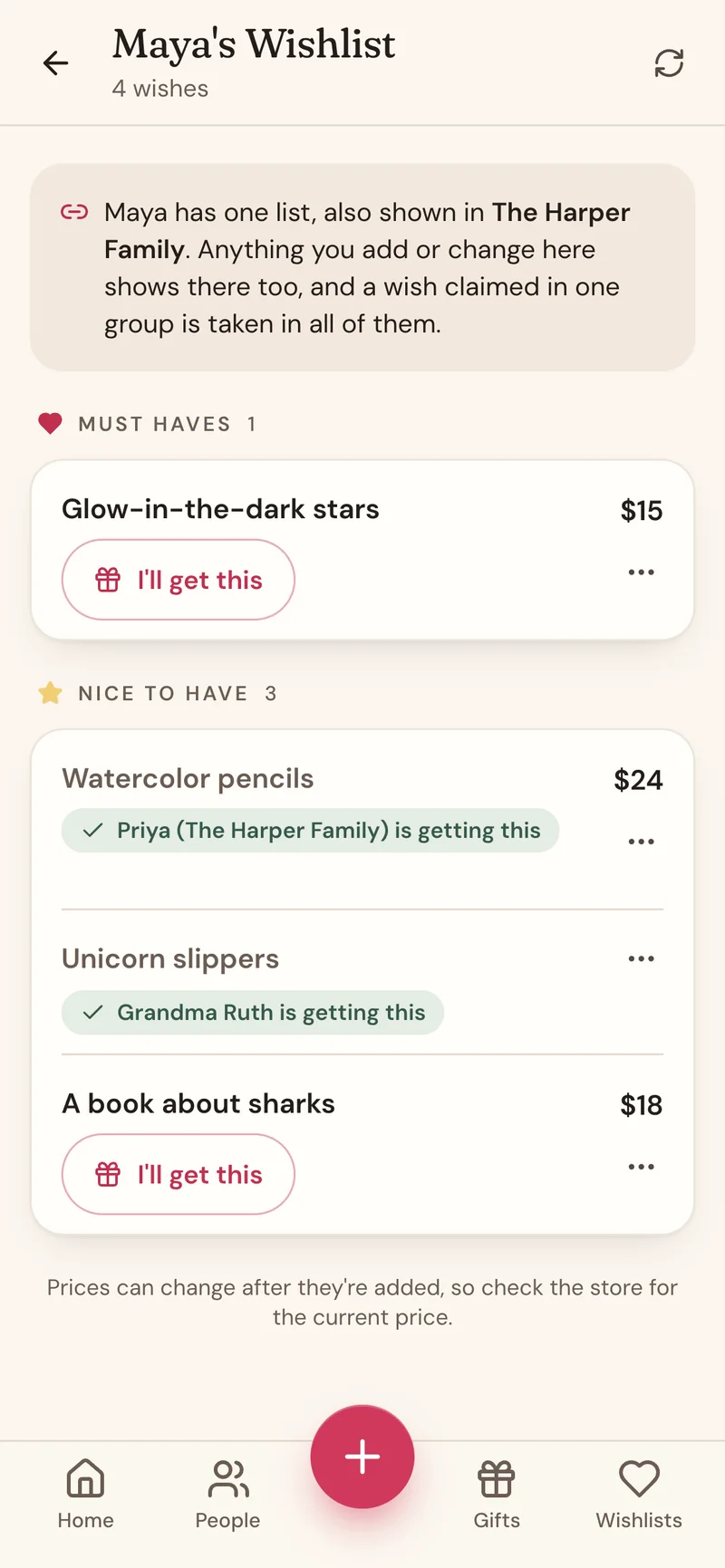
Maya's wishlist in The Bennett Family as her parent sees it: also shown in The Harper Family, with Priya's claim from there and Grandma Ruth's from here

And everything you’d expect.

Links from any shop

Paste a product link from any store and Wishpile grabs the name, price and photo, so a list of things they already want takes minutes.

Both parents keep it

Share a household with your partner and you can both add wishes and see what has been claimed.

Share by link

Send your child's list to anyone outside your groups, like a godparent or a teacher. They can claim from the link, and those claims show in your groups too.

Older kids add their own wishes

Copy your child's own link to their tablet or phone. They can add wishes and shop everyone else's lists, and never see what's been claimed on theirs.

Already made it in your account?

Made your child's list as one of your own wishlists? Tap This is my child's list and it moves to Your kids, with every wish and claim kept.

Budgets for the givers

When you claim something, it lands in your gift plan with a budget for your child, so you can see what you've spent.

Track it to wrapped

Every gift you are giving moves from idea to bought to arrived to wrapped, so nothing hides in the closet unwrapped on the 24th.

The whole family in one place

Your kids' lists sit beside everyone else's wishlists in the family group, grandparents included.

04Why Wishpile

Does my child need an email or an account?

No. You keep your child's wishlist from your own account, and so can your partner. When your child is old enough to add their own wishes, give them their own link instead: they can add to their list and browse the family's, with no email, no password and no app to install.

I pasted the website and it was instant.

A Wishpile useron adding the first thing to their list

05Questions

Kids' wishlist questions

The short answers, before you start.

See every question
How do I make a wishlist for my child?
In Wishpile, open your family group and tap Add my child, then type their name. Their wishlist is ready straight away, with no email or account for your child. Open it from Your kids on the Wishlists tab and tap + to add wishes, or paste a product link to fill in the name, price and photo.
Can grandparents see my child's wishlist and claim gifts without signing up?
Yes. Everyone in your family group can open your child's list and tap I'll get this. Relatives you invite get their own link, so they can browse the family's lists and claim gifts with no account and nothing to install.
Will my child see what has been claimed?
No. You and your partner see which wishes are claimed and by whom, so you don't buy the same thing. Your child's own link never shows the claims on their list, so the surprise is safe. Keep the list's share link for relatives, since anyone who opens it can see what's taken.
How do I share one list with both sides of the family?
Add your child to each family group, for example one for Mom's side and one for Dad's side. If they're already in one group, pick them under Who? when you add them to the next, and their list comes with them. Every group shows the same list, and a gift claimed in one group shows as taken in all the others.
Can I add links from Amazon, Target and other stores?
Yes. Copy the product link from any shop, website or app and paste it in. Wishpile fills in the name, price and photo, in the shop’s own currency. You can also add a wish by hand with just a name.
I already made my child's list as one of my own wishlists. What now?
Tap the ... button on that wishlist and choose This is my child's list. Check their name and pick the family groups to show it in. Everything on the list stays, including gifts already claimed, and from then on you and your partner can see claims and claim gifts too.
Is Wishpile's kids' wishlist free?
Yes. Wishpile is free, including kids' wishlists, family groups, claiming, budgets and Secret Santa.

Your turn

Give every kid one list.

Make their wishlists once, share them with the whole family, and let the grandparents claim without a single double-up.

Free.No credit card.Nothing to install.