When you're signed in, you can shop a family member's group wishlist and call dibs on a gift. Wishpile adds it straight to your own gifts, so it's part of your plan from the start.
Steps
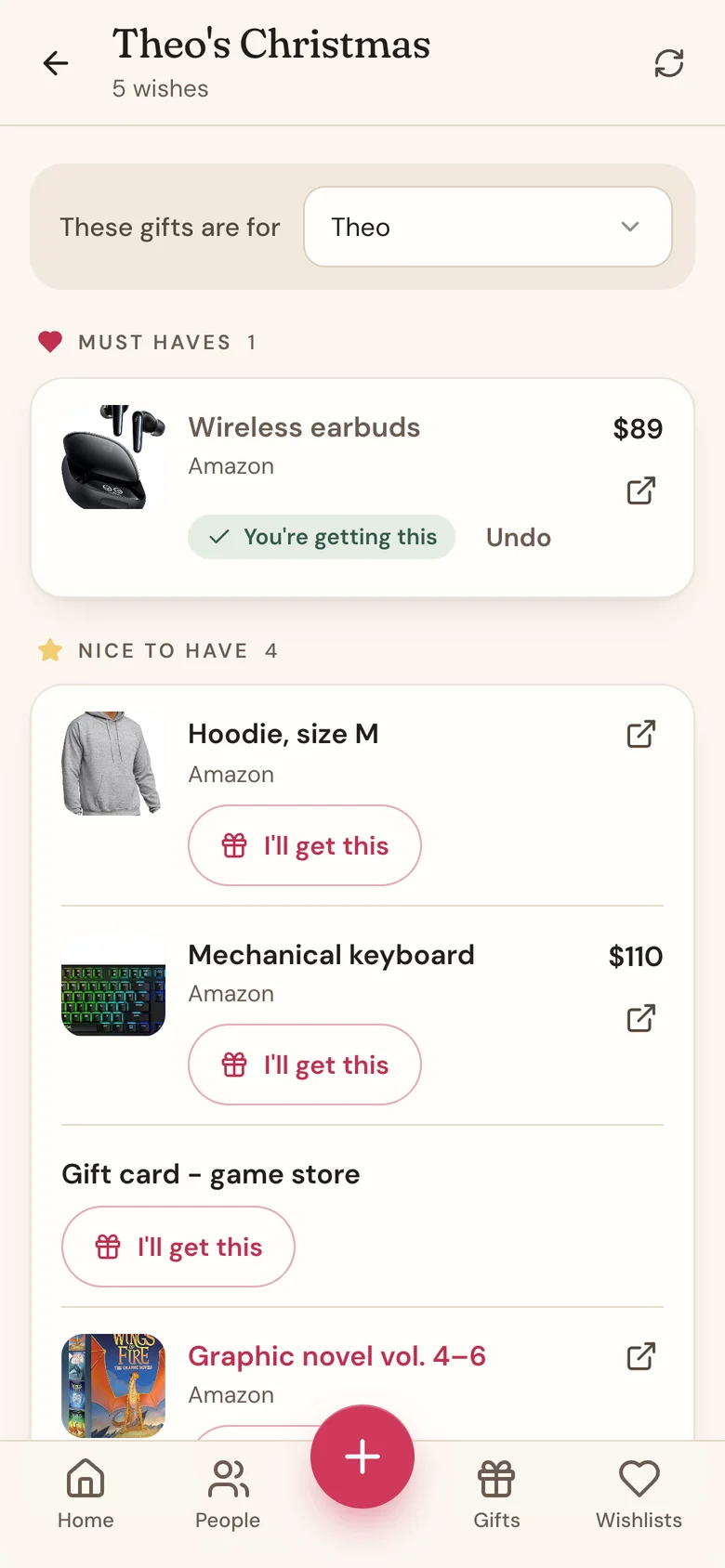
- Tap Wishlists in the bottom bar, open the group's card, and tap a member's name. (On the group's Home, you can also tap their name under Wishlist progress.)
- At the top, next to These gifts are for, check the person on your gift list you're shopping for. If someone on your gift list has the same name as the member, Wishpile picks them for you. Otherwise, pick them yourself.
- Find a gift and tap I'll get this.
- The gift is added to that person as an Idea, with its price, link, and photo. On the wishlist it now says You're getting this.
- Changed your mind? Tap Undo.
Good to know
- The person whose list it is never sees claims. On their own list, every wish looks open.
- Other signed-in members see who's covering a wish, like "Priya is getting this", so nobody doubles up. People using an invite link just see Claimed.
- Undo also removes the gift it added to your list.
- Every claim is filed under someone on one of your gift lists, so you need at least one person there first. No people yet? Add people, then come back and the These gifts are for picker appears.
- Once you've bought it, move the gift along from Idea like any other gift.
Related
Still stuck?
Ask Wishpile and get an answer in seconds, or email support@wishpile.com and a real person will get back to you. Quick answers live in the FAQ.