Switch Home over to a wishlist group and it becomes that group's dashboard. It's the quickest way to see who's ready and what's new.
Steps
- Tap Home in the bottom bar.
- Tap the list name at the top of the screen to open the switcher.
- Under Groups, tap your group. Home now shows the group instead of your gift list.
- To switch back, open the switcher again and pick a list under My lists.
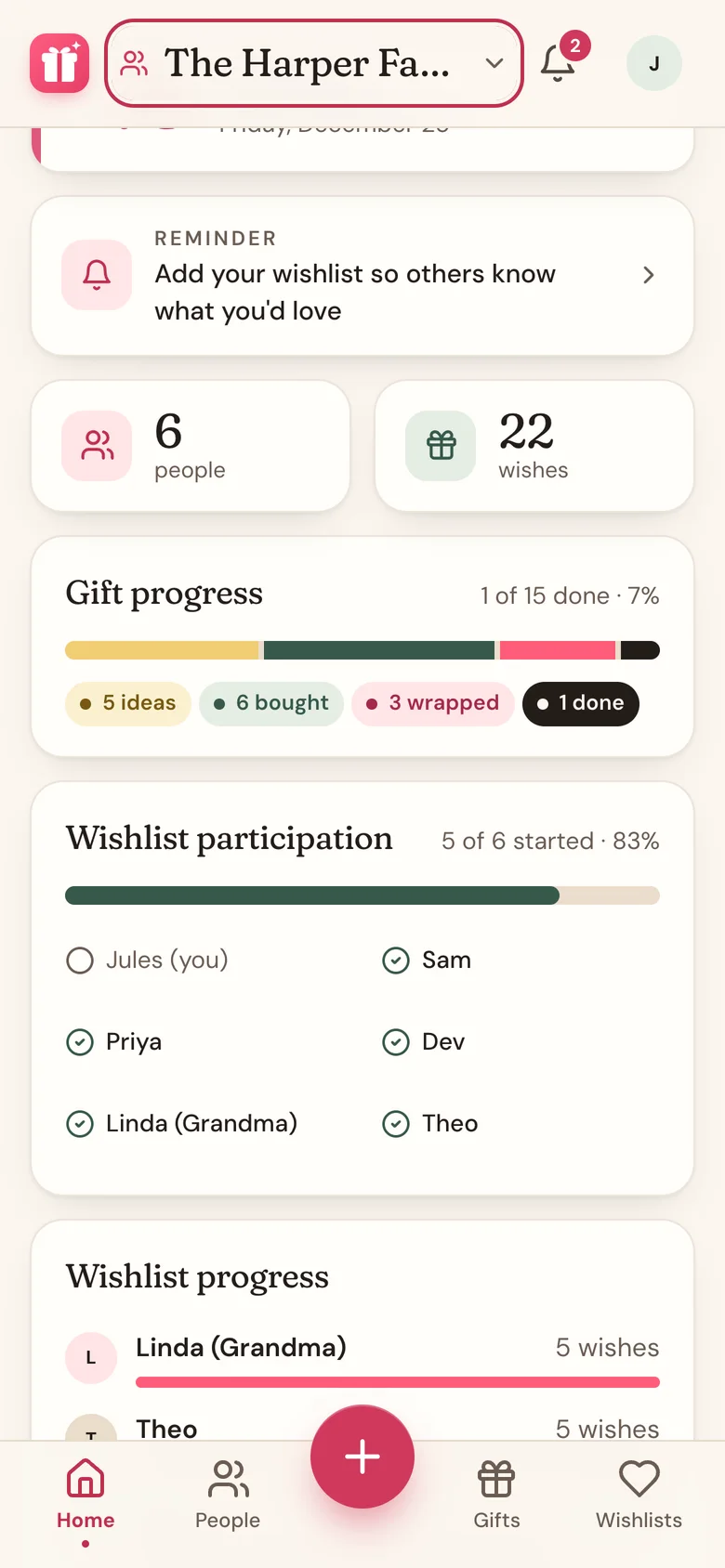
What you'll see
- A countdown to the group's date, from its linked gift list or the date the organizer set. It's hidden if there's no date or the day has passed.
- A reminder if your own wishlist in the group is still empty. Tap it to start adding.
- People and wishes in the group, counted up.
- Gift progress, for the organizer only, when the group is linked to a gift list. It shows how your own gifts on that list are coming along.
- Wishlist participation: a check next to everyone who has started their wishlist.
- Wishlist progress: how many wishes each person has. Tap a name to open their list.
- Recent wishes: the newest additions, plus a note when some wishes are missing a price.
- Your wishlist: tap Add wishes (or Add more) to keep your own list current.
- Manage group (organizer) or Open group (everyone else) takes you to the group on the Wishlists tab.
Good to know
- Nothing here shows who's buying what, only whether lists have wishes, so it's safe for everyone to look.
- The switcher is also at the top of People and Gifts.
- Secret Santa groups get their own Home. See Draw names and see who you're buying for.
Related
Still stuck?
Ask Wishpile and get an answer in seconds, or email support@wishpile.com and a real person will get back to you. Quick answers live in the FAQ.