Wishpile keeps email to a minimum. Most emails come from noreply@wishpile.com, so add that address to your contacts if they land in spam. A wishlist a friend emails you shows their name, like "Jules via Wishpile".
Invites
Sent once, when someone invites you by email:
- Wishlist group: a group organizer added you. The button opens your wishlist for that group, no account needed. The organizer can send it again from the group.
- Secret Santa: you're in an exchange. Add your wishlist, then create an account with the same email to see who you drew.
- Household: someone wants to plan gifts with you. Sign in with the invited email and accept on Home or your Profile.
- Help with a gift or Help plan gifts: someone asked you to coordinate one gift, or every gift for one person. Sign in and find it under People, in Helping Out.
Wishlists people email you
When someone shares their wishlist with you by email, you get one email with photos of a few of their wishes and a button that opens the list. Reply to it and the reply goes to them. To stop getting these from anyone, tap Don't email me from Wishpile again at the bottom. More about sharing by email
Group emails
- Daily activity: one email on days your wishlist groups had new wishes or claimed gifts. Quiet days, no email.
- Weekly reminder: sent on Sundays, only when there's something to flag. That's an occasion two weeks away or less, your own wishlist in a group still being empty, or, for organizers, who hasn't added a wishlist yet.
Both keep the surprise. The daily email leaves out anything that happens on your own wishlist, the weekly reminder only mentions it when it's still empty, and nobody is named as the person who claimed a gift. Secret Santa has its own emails, below.
Secret Santa emails
- Names are drawn: sent when the organizer draws names, and again if they redraw. It never says who you drew; the button opens it in Wishpile.
- Exchange reminders: a week before the exchange and the day before, with the date, budget, and place. If your own wishlist is still empty, it says so.
- Add your wishlist: a few days after you're added if your wishlist is still empty, and a week before the exchange if it still is.
- New messages: when your Santa or the person you drew writes to you and you haven't read it in Wishpile within a few minutes. A quick back-and-forth comes as one email, at most one an hour per conversation. More about messages
- Organizer check-in: for organizers, on Sundays and a week before the exchange, only when something needs doing: names not drawn yet, people who haven't signed in, or empty wishlists. It never shows who drew whom.
Getting started tips
When you're new, Wishpile sends up to three short emails in your first week and a half: about a day after you sign up, around day 3, and around day 7. They stop as soon as you've added a gift, a wish, a person, or a group of your own, so most people get one or none. Reply to any of them and a person reads it.
To stop them, tap Stop these tips at the bottom of one, then Yes, stop these tips, or switch off Getting started tips in the Notifications card on your Profile. Group and Secret Santa emails aren't affected.
Account emails
When you sign up, you get Confirm your Wishpile account. If you ask to reset your password, you get Reset your Wishpile password.
Turn off group and Secret Santa emails
- Tap your avatar in the top right corner, then tap Profile settings.
- In the Notifications card, switch off Group and Secret Santa emails.
This one switch stops the daily activity email, the weekly reminder, and every Secret Santa email. Switch it back on anytime.
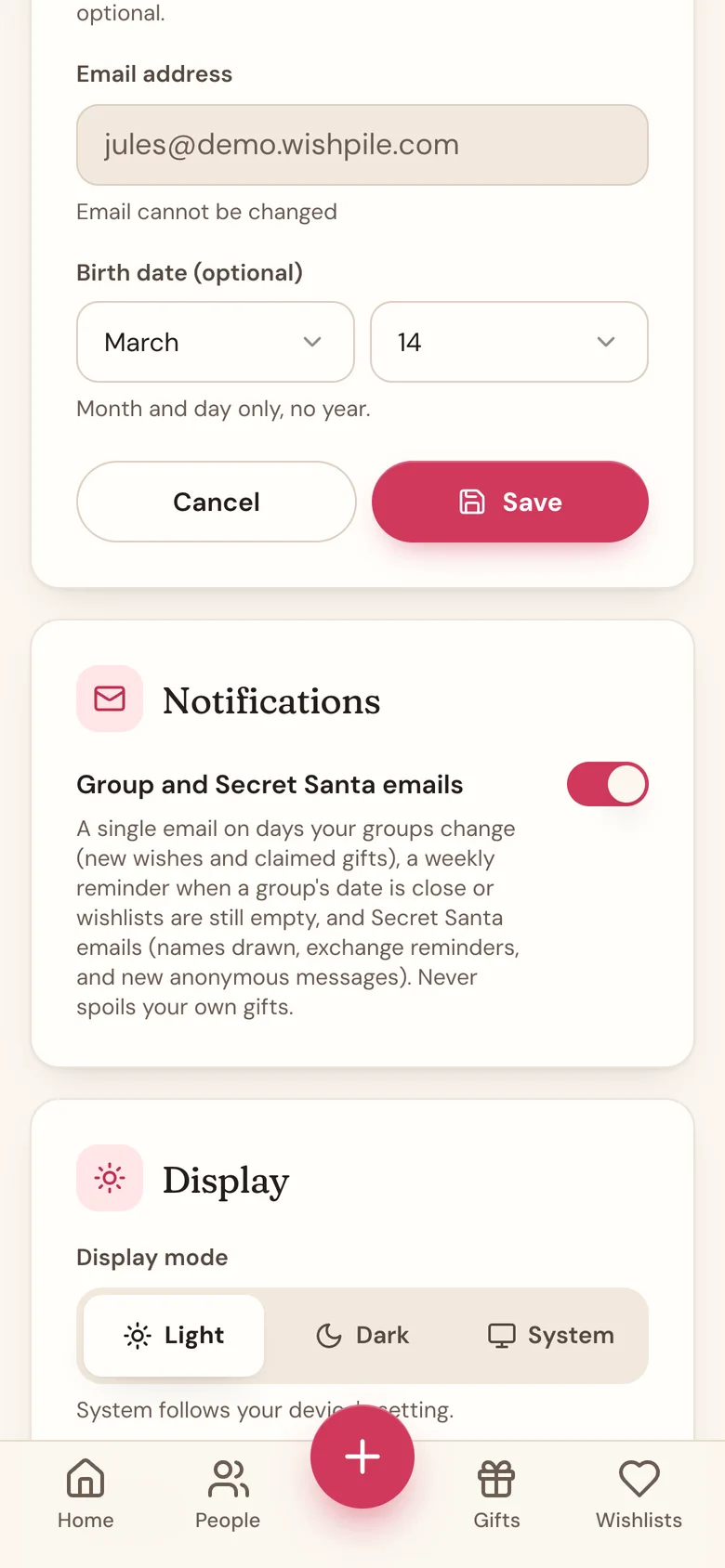
You can also tap Stop these emails at the bottom of any group or Secret Santa email. It opens a page on wishpile.com. Tap Yes, stop these emails to confirm. Just opening the link changes nothing.
Good to know
- If you joined a group without an account, Stop these emails turns them off for that group only.
- Invites and account emails are one-offs, so there's nothing to turn off.
Related
Still stuck?
Ask Wishpile and get an answer in seconds, or email support@wishpile.com and a real person will get back to you. Quick answers live in the FAQ.