Running a big exchange? Who's in shows everyone taking part and what each person still needs to do, so you know who to chase before you draw names.
Steps
- On the Wishlists tab, find your Secret Santa group's card and its draw under Draws.
- Tap Who's in. (On Home, you can also tap See who's in under the draw.)
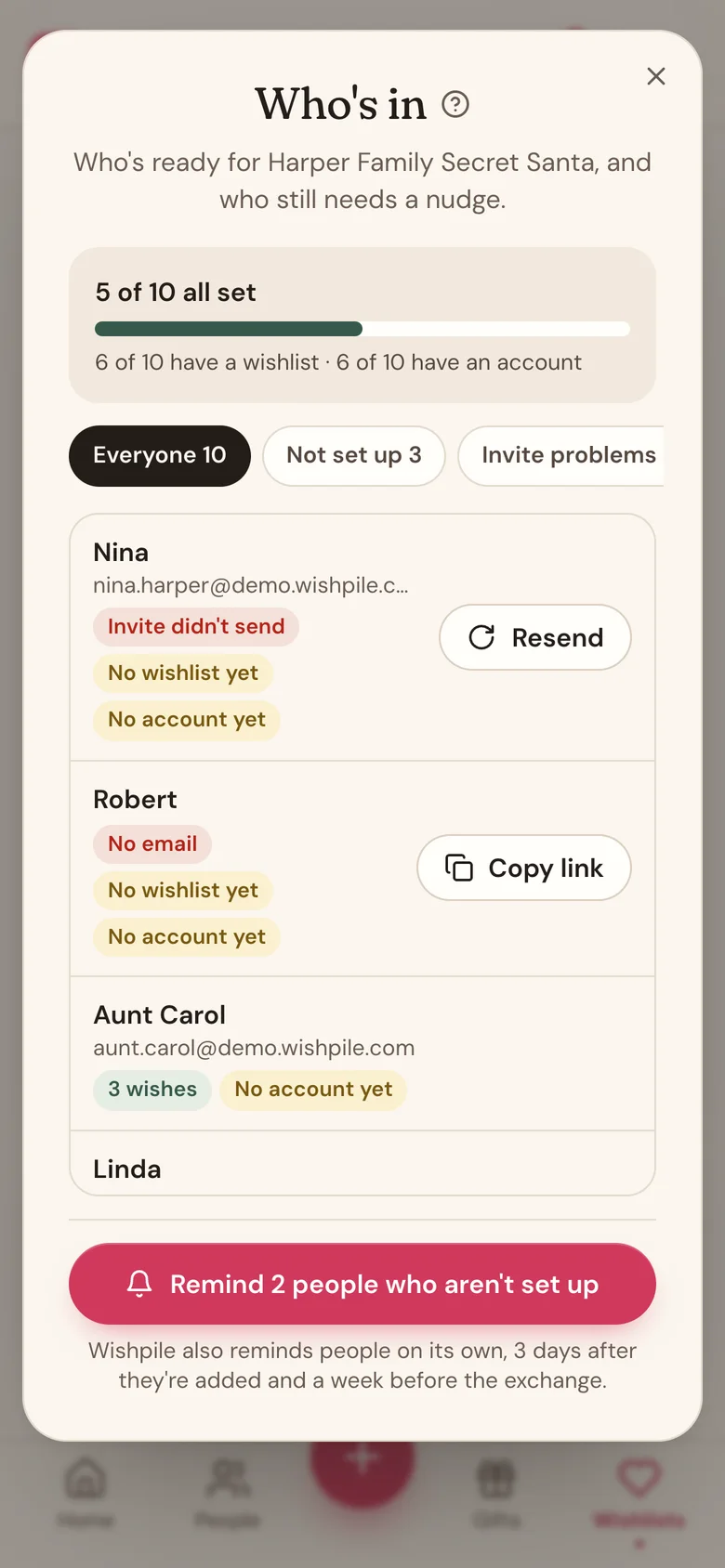
- The top shows how many people are all set. Tap Not set up, Invite problems or All set to see just those people. With a long list, type in Find someone.
- Fix any invite problems:
- Invite didn't send: tap Resend.
- No email: tap Copy link and send it to them yourself, or add their email from the group's member list.
- Tap Remind at the bottom, then Send reminders. Everyone who isn't set up gets one friendly email saying only what they still need to do.
Good to know
- "All set" means they have at least one wish on their wishlist and a Wishpile account. They need the account, under the email you invited, to see who they drew.
- A reminder waits at least 2 days after someone's last invite or reminder, so nobody gets a pile of emails. People who turned off group emails don't get reminders.
- Wishpile also reminds people on its own: 3 days after they're added, and a week before the exchange.
- Only you, the organizer, see Who's in. It shows wishlist sizes and sign-ups, never who drew whom or what anyone has bought.
Related
Still stuck?
Ask Wishpile and get an answer in seconds, or email support@wishpile.com and a real person will get back to you. Quick answers live in the FAQ.