A shared budget is one number the two of you aim to spend. Once it's set, the budget card on Home measures against it instead of adding up each person's budget. The household owner (the person who created it, marked with a crown) sets it.
Steps
- Tap your avatar in the top right corner, then tap Profile settings.
- Scroll to the Household card and find Shared budget (optional). If you're not the owner, you'll see the current amount here but can't change it.
- Type the amount you want to spend in total, then tap Set.
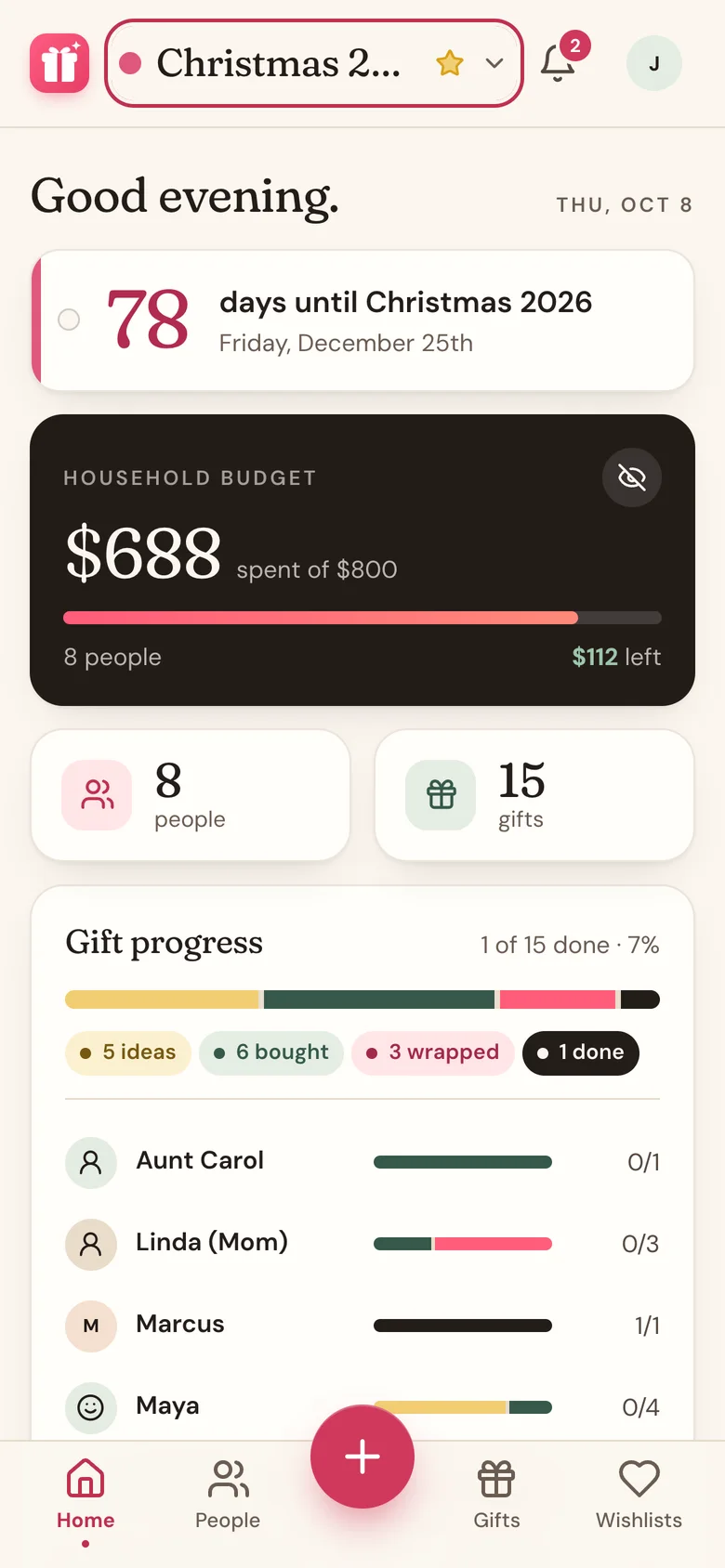
- Tap Home in the bottom bar. The budget card is now titled Household budget and shows how much is spent and how much is left.
Change or clear it
The owner can change the budget by typing a new amount and tapping Set again. To clear it, leave the box empty and tap Set. Home goes back to a plain Budget card that adds up each person's budget.
Good to know
- "Spent" counts gifts at Bought, Wrapped, or Done. Money other people chipped in isn't counted, so it shows what came out of your pocket.
- The card shows spending on the list you have open. Switch lists and the spent figure changes, but the budget stays the same.
- You and your partner may see slightly different spent figures, because gifts meant for you are hidden from you.
- Budgets you set for each person still show on their own card.
- Go over the shared budget and the bell shows a reminder with how far over you are.
- Tap the eye button on the card to hide the amounts, handy when someone's looking over your shoulder.
Related
Still stuck?
Ask Wishpile and get an answer in seconds, or email support@wishpile.com and a real person will get back to you. Quick answers live in the FAQ.