Somebody volunteered you. Now there is a spreadsheet with 100 names, a reply-all thread titled "SECRET SANTA!!!" that is already 40 messages long, and three people asking whether gag gifts count. A small family draw can run on a mixing bowl and a group text. An office of 100 can't, and the hard part isn't the draw. It's getting everyone signed up, then finding the dozen people who never opened the email.
TL;DR: Use a Secret Santa app that takes your whole list at once and shows you who is ready. Paste names and emails from your spreadsheet, set a small budget and a date, give it a week, remind the stragglers, then draw names. In Wishpile, that's Paste a list to invite everyone and Who's in to see who still needs a nudge, and it's free.
What do you need before you start an office Secret Santa?
You need four things before anyone gets an invite: a list of who's in, a budget, an exchange date, and a rule about where gifts go.
- Who's in. Make it opt-in. Ask people to reply or add their name to a sheet by a set day. A Secret Santa people were drafted into produces the gift-card-in-an-envelope energy you are trying to avoid. You'll want each person's name and work email.
- A budget. Pick one number and say it out loud. Most offices keep it small so nobody feels pressured, and a fixed number does more for fairness than any other rule.
- A date. Usually the last in-office day before the holidays, or a team call for remote groups. Give people at least two weeks from the draw to shop.
- Where gifts go. Brought to the office, or mailed to remote teammates? Decide now, because it changes what people buy.
How do you set up a Secret Santa for 100 people?
Set it up from the list you already have rather than typing names one at a time. In Wishpile:
- Create a Secret Santa group and add the budget and exchange date.
- Under Participants, tap Paste a list, then copy the name and email columns straight out of your spreadsheet and paste them in. A header row is fine.
- Tap Check list. Wishpile flags anything that doesn't look like an email, suggests a fix for typos like "gmial.com", and skips anyone listed twice.
- Create the group. Everyone gets an invite email at once, and you'll see how many went out.
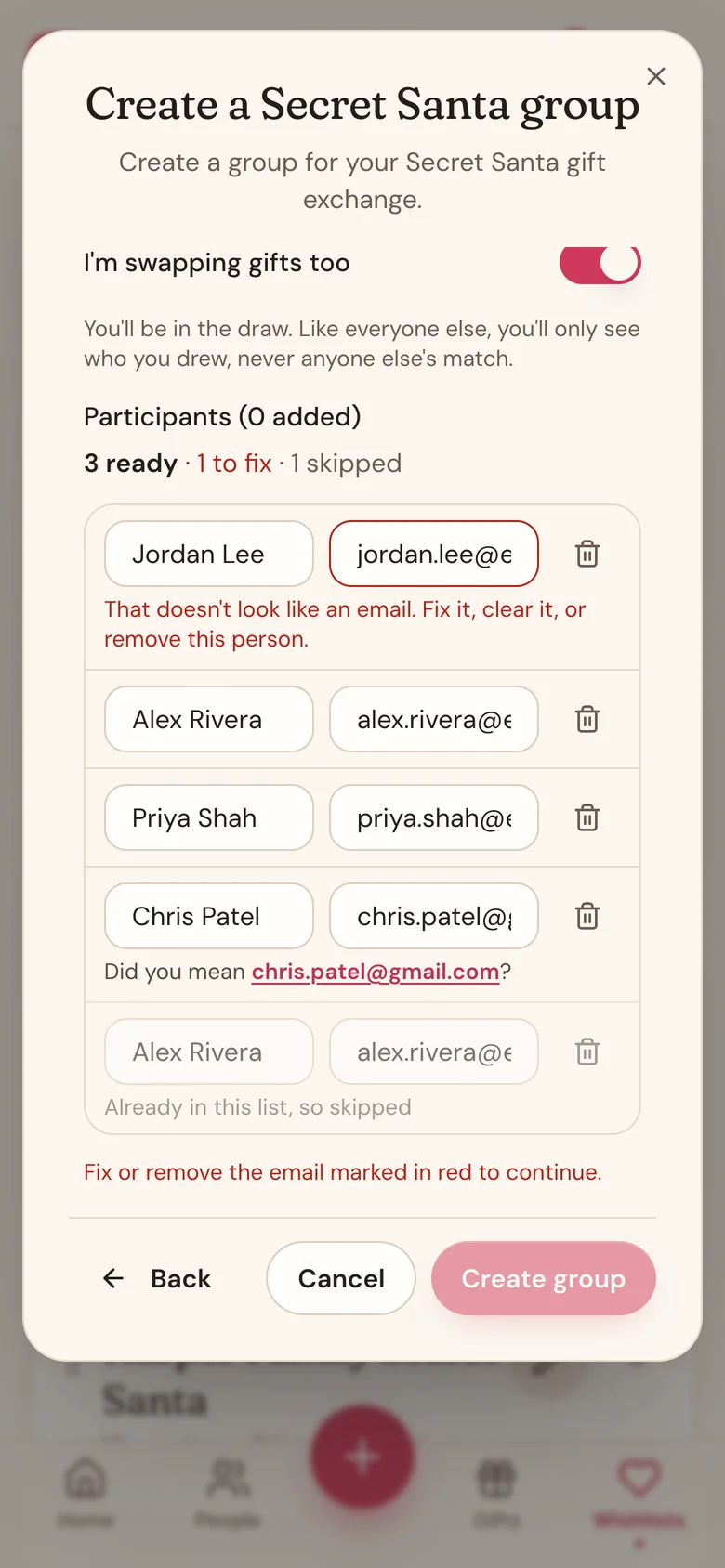
The checking step matters more than it looks. With 100 addresses, a few always have a typo, and a mistyped email means someone who never hears about the exchange and assumes they were left out.
How do you get everyone in an office Secret Santa to actually sign up?
Expect about a third of people to do nothing until reminded. That's normal, so plan for it rather than taking it personally:
- Announce it where people already are. Post in Slack or Teams the day the invites go out, so people know to look for the email.
- Ask IT to allow the sender. Company spam filters can be strict with an email sent to many people at once. If you use Wishpile, the invites come from noreply@wishpile.com.
- Watch who's ready, not your inbox. Wishpile's Who's in screen shows, for each person, whether they've added a wishlist, whether they've made the free account they need to see who they drew, and whether their invite didn't send.
- Remind once, kindly, in one tap. From Who's in, one button emails everyone who isn't set up yet, saying only what each person still needs to do. Wishpile also sends its own reminders 3 days after someone is added and a week before the exchange.
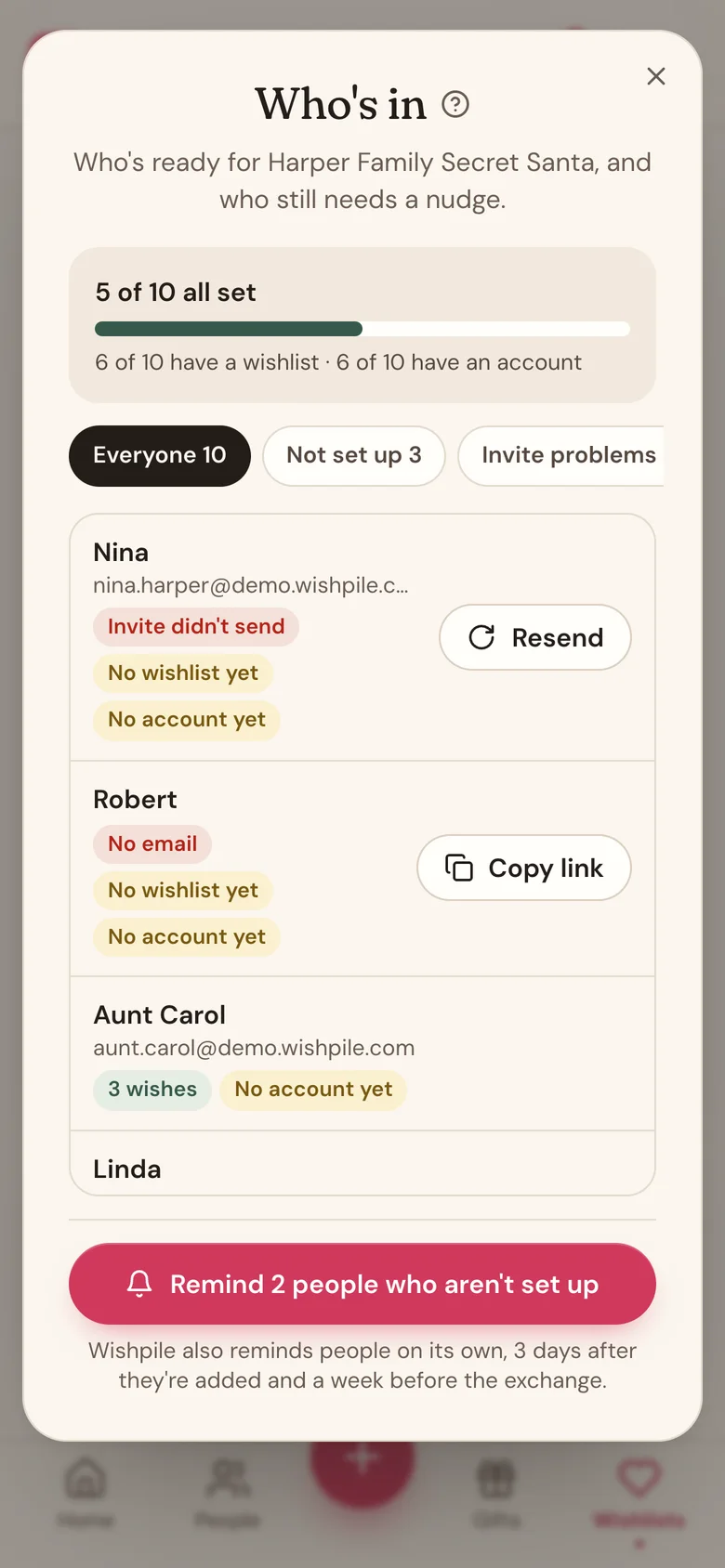
Give it a week, send one reminder, then draw. Don't wait for 100 percent. If someone still hasn't shown up after a reminder and a Slack message, they probably aren't playing, and that's fine.
How do you keep an office Secret Santa fair?
Three rules cover almost every complaint:
- Keep partners apart. If two coworkers are a couple, or share a house, set an exclusion so they can't draw each other. Wishpile respects every exclusion on the first draw and tells you if your rules make a fair draw impossible.
- One budget for everyone. It stops the awkward moment where one person spent five times what everyone else did.
- Nobody sees the full list, the organizer included. People quietly trade matches when they know who has whom, and the surprise falls apart. In Wishpile each person sees only their own match, and the organizer can't see anyone's. If you're organizing and don't want to play, you can sit the draw out.
Wishlists help too. A coworker you've only met on video calls is hard to shop for, and three ideas from them beat another mug.
How do you include remote coworkers?
Run everything online and decide the shipping question up front. The draw, the reveal, and the wishlists all work the same whether someone sits by the printer or six time zones away.
If gifts are mailed, give people extra time and suggest ordering straight to the recipient. A Santa who needs an address or a size can ask through Wishpile's anonymous messages without giving away who they are. For the exchange itself, put a video-call link in the event details and open gifts together.
What should the organizer do on exchange day?
Keep it short and light. Open gifts in a circle or on the call, let people guess their Santa if your team enjoys that, and have a spare gift or two in a drawer for anyone whose Santa had a bad week. Then you're done until next year, when you can start from the same list.
Common questions
Is there a free Secret Santa app for work?
Yes. Wishpile is free, with no ads and no paid tier. Pasting a list, Who's in, reminders, exclusions, wishlists, and anonymous messages are all included, and it runs in any browser, so there's nothing to install on a work laptop.
Does everyone need an account to join an office Secret Santa?
Not to add a wishlist: anyone invited by email can add one straight from the invite link. To see who they drew, each person needs a free Wishpile account under the same email address the invite went to. Who's in shows the organizer who still needs one. Here's what participants need to do.
Can the organizer see who has whom?
No. In Wishpile the draw runs privately and each person sees only their own match. The organizer can see who's ready and who isn't, but never who drew whom.
Can I add people after I've sent the invites?
Yes. Open the group, tap Add a member, and you can paste more names the same way. If you've already drawn names, draw again so the new people are included, ideally before anyone starts shopping.
What if some invites go to spam?
Check Who's in. It marks anyone whose invite didn't send, with a button to resend. Then ask IT to allow emails from noreply@wishpile.com, and post the group's invite link in Slack so people can join without the email.
How long before the exchange should we draw names?
At least two weeks before, three if anyone is shipping gifts. Give people about a week to sign up first.