A Christmas gift spreadsheet needs eight columns: Person, Gift, Store, Link, Price, Status, Hiding spot, Notes. Add a budget column per person and two formulas, and you have something better than most paid tools.
Here's the whole template, then the honest part: the four specific places a spreadsheet stops being the right answer. We build gift-tracking software, so you can guess which way we lean. We'd still rather tell you the truth about the four places, because three of them you can live with.
The template
Nine columns, one row per gift. Copy the header row and you're done in under a minute.
| Column | What goes in it | Why it earns its place |
|---|---|---|
| Person | Who the gift is for | Every useful view of this sheet sorts by this |
| Gift | What it is, specifically | "Blue hoodie, size M", not "hoodie" |
| Store | Where you bought or saw it | Returns, price matching, and "where was that again" |
| Link | The product URL | Your future self will not re-find it |
| Price | What you paid, or expect to | Keep it a plain number so it adds up |
| Status | Idea, Bought, Wrapped, Done | The most important column, and the one everyone leaves out |
| Hiding spot | Six words, max | "Hall closet, red duffel" |
| Notes | Size, color, who it's from | The catch-all |
| Budget | Only on each person's first row | Lets the formula below work |
Paste this into cell A1, then use Data > Split text to columns in Google Sheets (or Data > Text to Columns in Excel) and pick comma:
Person,Gift,Store,Link,Price,Status,Hiding spot,Notes,Budget
The two formulas worth adding
Everything else is optional. These two are not.
Spent per person. In a column next to Budget, with people in column A and prices in column E:
=SUMIF($A:$A, A2, $E:$E)
Spent in total, somewhere out of the way:
=SUM(E:E)
The second one is the number that changes behavior. Christmas totals creep up a gift at a time, and seeing yours live in November is more effective than any amount of resolve in October.
Three settings that take one minute each
- Freeze the header row. View > Freeze > 1 row. You'll scroll more than you expect.
- Make Status a dropdown. Data > Data validation, with the four values. It stops the column drifting into "bought?", "BOUGHT", and "got it".
- Color the over-budget rows. Conditional formatting on your spent column, red when it's greater than the budget cell.
That's the template. It's genuinely good, and if you stop reading here you'll have a better December than most people.
Where a spreadsheet breaks
Four places. The first three are annoyances. The fourth is the one that actually ruins something.
1. Your phone
You buy gifts standing up, on a phone, usually with about forty seconds of attention. Spreadsheets on a phone are a known tragedy: tiny cells, a keyboard covering the row you're editing, horizontal scrolling to reach column F.
What happens in practice isn't that you fill it in badly. It's that you tell yourself you'll do it tonight, and tonight doesn't happen, and by the end of November the sheet is two weeks behind the truth. A gift tracker that's two weeks behind is worse than no tracker, because you still trust it.
2. The receipt
A receipt is a photo. A cell is a cell. You can paste an image into a modern sheet, technically, and the result is a row three inches tall that you'll delete by January.
So receipts go where receipts always go: a coat pocket, a camera roll with four thousand other photos, the bottom of a tote bag. Then the sweater is the wrong size and the return window is a week long.
3. Next year
Every January the sheet becomes a historical document, and every October you start a new one from nothing, or copy the old one and spend twenty minutes deleting last year's gifts while keeping the people and the budgets.
It's not hard. It's just friction at precisely the moment the season starts, which is the moment friction does the most damage.
4. The person you're buying for
This is the real one.
Your gift spreadsheet lives in Google Drive, on the family laptop, or in a shared iCloud folder. It is the single most interesting document in your house to the people named in column A.
And a spreadsheet has no idea who's reading it. There is no way to show your partner the rows for their mother and hide the rows for them. Hidden rows are visible to anyone who clicks the little arrow. A separate "do not open" sheet is an invitation. A password-protected file that you open on the shared laptop is a file your browser remembers.
So you either accept that your plan is readable, or you keep a second secret copy, which is how you end up with two sources of truth and a double-bought gift.
What we built instead
Wishpile is, structurally, the same nine columns. Gifts sit on the person they're for, with a price, a store, a link, notes, and one of four stages: Idea, Bought, Wrapped, Done. Switch the Gifts tab to List and it's the spreadsheet view - every gift on the list in one place, sortable by person, gift, progress, or price.
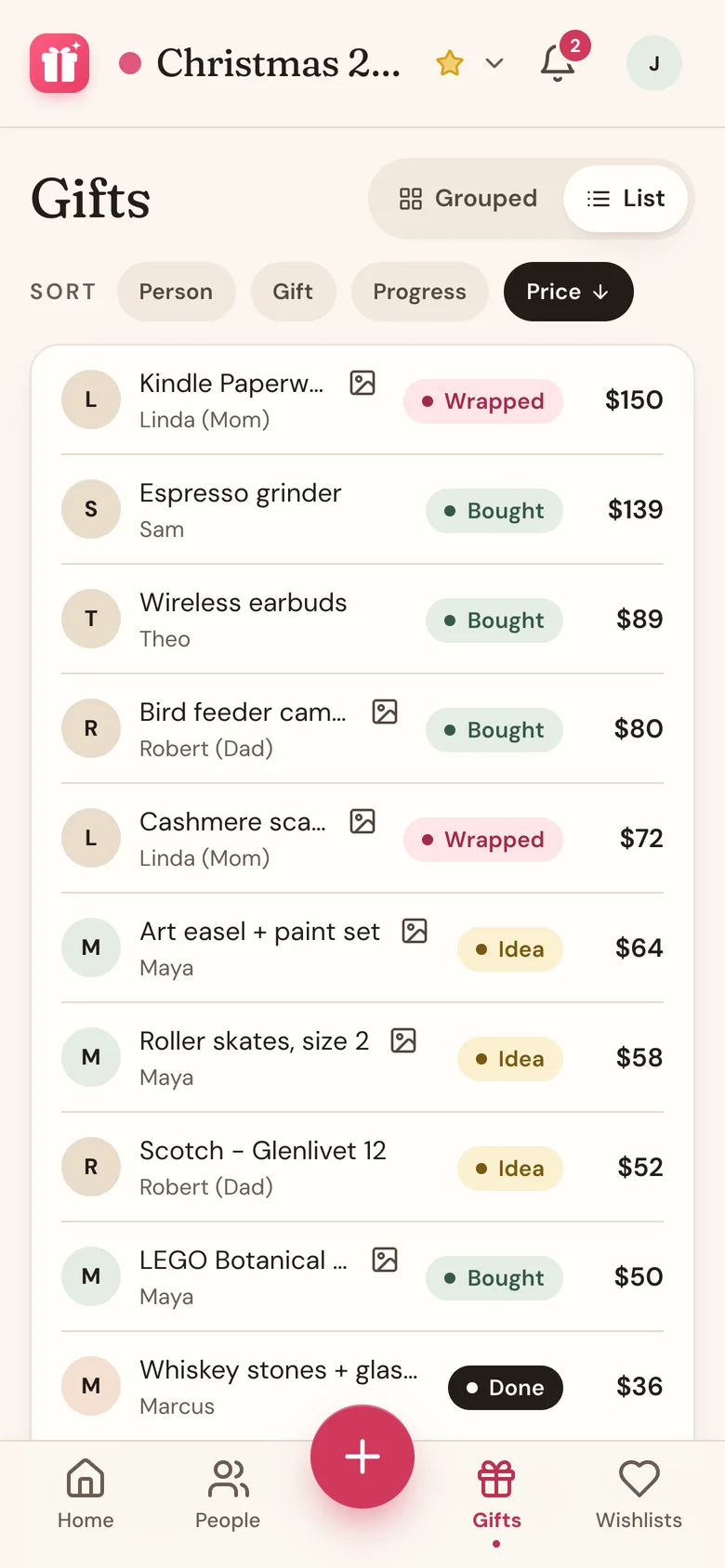
Four differences, matching the four problems above:
- It's a phone app that isn't an app. It runs in your phone's browser with nothing to install, and adding a gift is pasting a product link - the name, price, store, and photo fill themselves in.
- Receipts attach to the gift. Snap it, and it's on the gift, with the photo of the thing you actually bought next to it.
- Totals count themselves, and only when they should. A gift counts toward your spend once it's Bought, so your ideas don't inflate the number. Prices from foreign shops convert at the day's rate.
- Next year takes a minute. Clone the list, pick who's coming along, keep their budgets, and choose whether to bring over no gifts, just the ideas you never bought, or all of them.
And for problem four: in a household, you link your partner's entry on your list to their account, and every gift you plan for them vanishes from their view. Not greyed out, not "hidden row" hidden. Gone, with no hint that anything is there, and left out of their reminders too. Your own wishlist works the same way in reverse - you never see who claimed what, so your family can coordinate without spoiling anything.
You can still have the spreadsheet
Here's the part we'd want to know if we were you: the Gifts tab has an Export to CSV button. One row per gift, with person, gift name, status, cost, currency, tag number, and notes, and it opens in Excel, Numbers, or Google Sheets.
So this isn't a trade. Keep the sheet for the January reckoning, or for your own peace of mind about where your data lives, and let something phone-shaped do the part where you're standing in a store at 4pm.
Common questions
Is there a free Christmas gift list spreadsheet template?
The column layout above is free to copy, and it's most of what paid templates sell. Nine columns, one row per gift, and two SUMIF formulas.
What columns should a Christmas gift spreadsheet have?
Person, Gift, Store, Link, Price, Status, Hiding spot, Notes, and a Budget column on each person's first row. Status is the one people skip and then wish they hadn't, because "bought" and "wrapped" are different problems in December.
Should I use a spreadsheet or an app to track Christmas gifts?
Use a spreadsheet if you shop mostly at a computer and nobody else uses it. Use an app if you shop on your phone, want receipts attached, or share a device with someone you're buying for. The last one is the only difference that can't be worked around.
How do I hide my gift spreadsheet from my family?
You mostly can't, with any reliability. Hidden rows unhide, shared drives get browsed, and a saved password does the rest. If secrecy matters, use something that can hide specific gifts from specific people. Wishpile does that, and it's free.
How do I track my Christmas gift budget?
Give each person a number, then total what you've actually spent against it, counting only gifts you've bought rather than ideas you're considering. That one distinction is what makes a budget useful instead of alarming.